What the messages are
OnCrew is an AI phone answering service for home-service contractors. The only text messages it sends are account notifications to the subscribing business owner's own phone number: a short summary each time their OnCrew line answers a call (caller name, service requested, urgency). There is no marketing and no messaging to consumers or third parties. Message frequency varies with the business's call volume. Message and data rates may apply.
Consent is collected in writing, in the product, at the moment the business owner gives us a phone number. Consent is never a condition of purchase: the phone field is optional everywhere it appears, and the service works without it (alerts go to email).
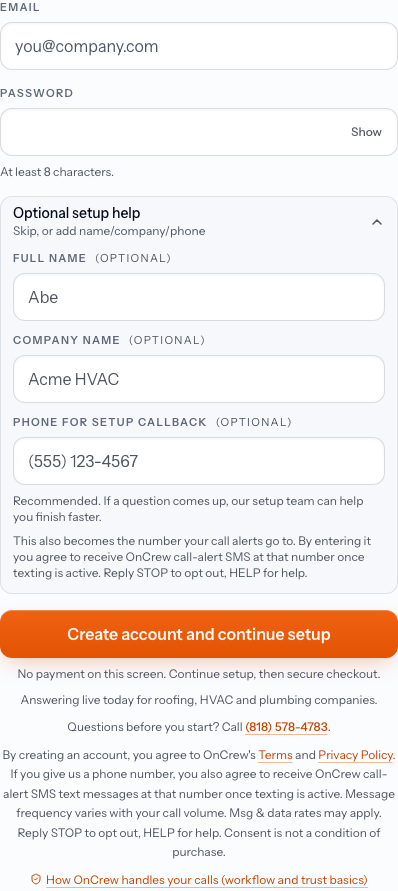
1. Account signup (public page)
Page: https://oncrew.ai/signup
The phone field is optional and empty by default. There is no pre-checked box. The consent sits directly under the field, and the page's legal line repeats it.
“This also becomes the number your call alerts go to. By entering it you agree to receive OnCrew call-alert SMS at that number once texting is active. Reply STOP to opt out, HELP for help.”
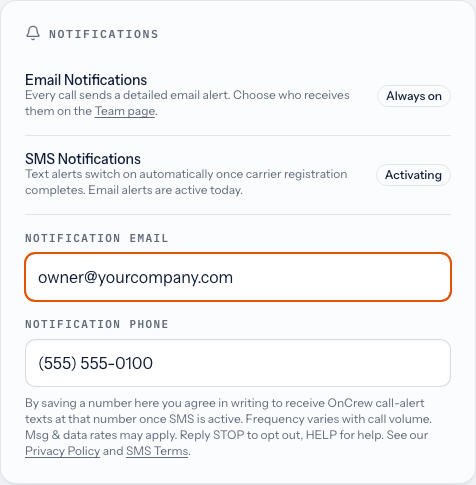
2. Account settings, Notification Phone (behind login)
Page: https://oncrew.ai/settings
Where an existing customer adds or changes the number that receives call alerts. Saving the number is the written opt-in.
“By saving a number here you agree in writing to receive OnCrew call-alert texts at that number once SMS is active. Frequency varies with call volume. Msg & data rates may apply. Reply STOP to opt out, HELP for help. See our Privacy Policy and SMS Terms.”
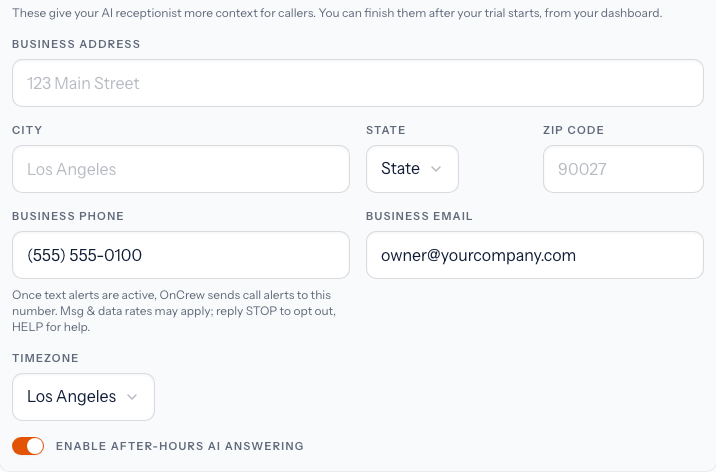
3. Guided setup, Business Phone (behind login)
Page: https://oncrew.ai/onboarding
The optional setup step after account creation. The same disclosure appears under the field.
“Once text alerts are active, OnCrew sends call alerts to this number. Msg & data rates may apply; reply STOP to opt out, HELP for help.”
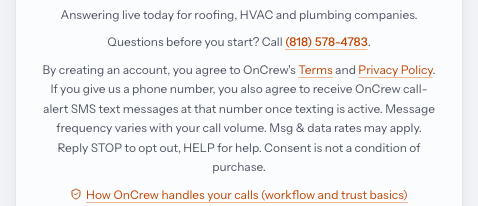
Signup page legal line
“By creating an account, you agree to OnCrew's Terms and Privacy Policy. If you give us a phone number, you also agree to receive OnCrew call-alert SMS text messages at that number once texting is active. Message frequency varies with your call volume. Msg & data rates may apply. Reply STOP to opt out, HELP for help. Consent is not a condition of purchase.”
How to opt out
Reply STOP to any OnCrew text to opt out immediately. Reply HELP for help. A business owner can also remove or change the number at any time under Notification Phone in their account settings, or by emailing support@oncrew.ai.
Mobile information and SMS opt-in consent are not shared with third parties or affiliates for marketing or promotional purposes. Full terms: Privacy Policy (section 9, SMS/Text Messaging and Mobile Information) and Terms of Service (section 12, SMS Text Alert Terms).